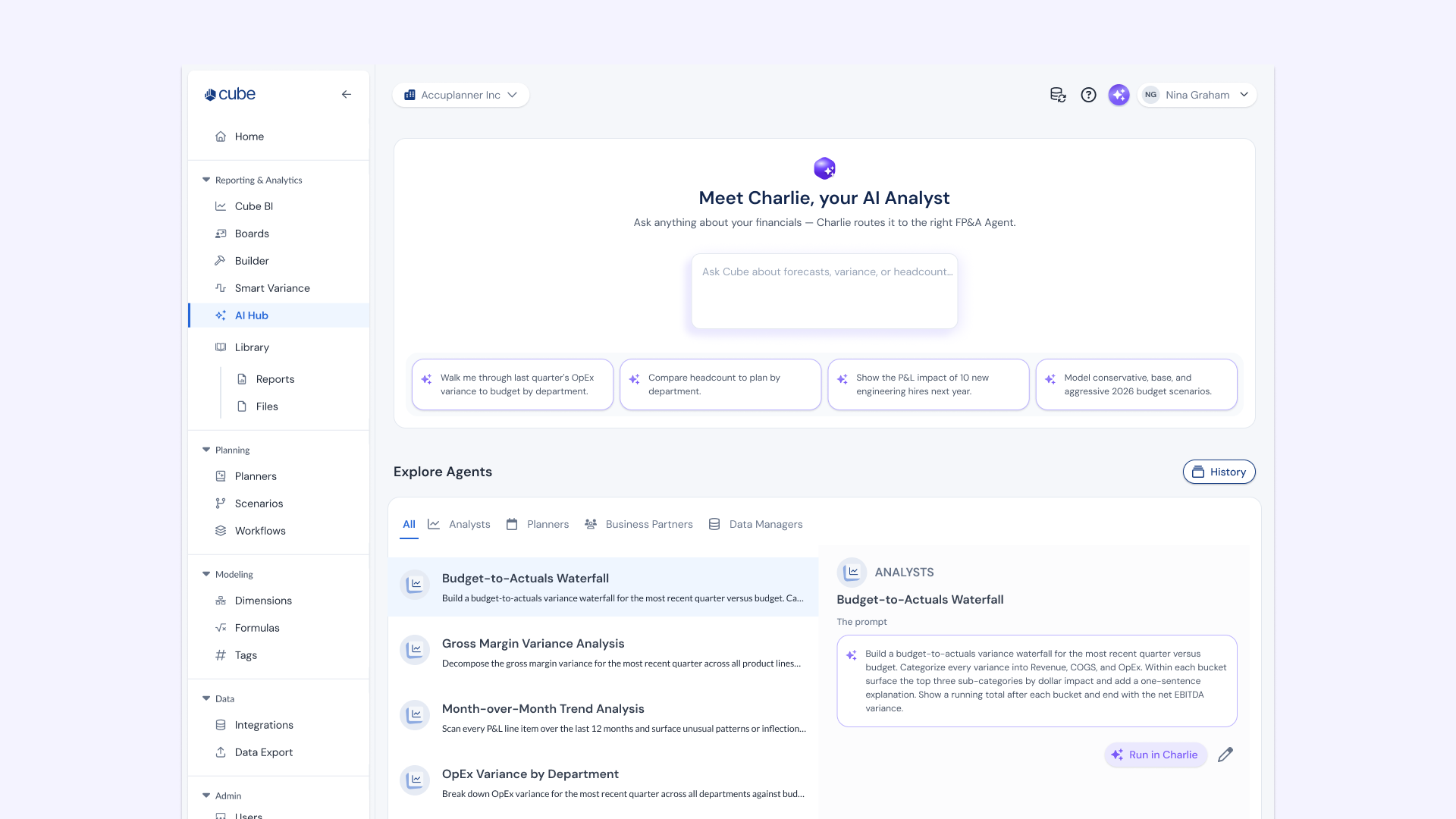
I led UX design for Cube's AI Agent from a single lightweight panel (2025) to Charlie, a unified AI Hub that routes requests across the portal, Slack, and Excel (2026, shipped). Along the way I ran cross-functional alignment, redesigned the navigation IA around AI, and built a user-driven system for prioritizing what AI should do next.

Cube AI Agent: Designing AI That Fits Into How People Actually Work


PROJECT TYPE
Industry — Enterprise SaaS AI
MY ROLE
Lead UX Designer — AI Agent & Integrations
TEAM
Cross-functional with Product & Engineering
PLATFORM
Web Portal, Slack, Cube Sheet
METHODS
STATUS
Shipped
Team & Role
I led UX design on this work from the start. In 2025, I designed the initial AI Agent experience as the sole designer on the effort. As the surface area expanded, a second designer joined Cube for a period and I split feature work with them, while continuing to own the underlying interaction patterns and design system that kept the experience consistent across surfaces. Today I'm the only product designer on the team, and I continue to lead this work, including the consolidation into Charlie.
The Problem
When Cube started building AI features, the question wasn't just "what should AI do?" — it was "where does it live, and how does it show up consistently across everything?" As the product expanded across the web portal, Slack, and a spreadsheet plugin, there was a real risk of AI feeling scattered — different interactions, different patterns, different levels of trust depending on where you were. My job was to figure out the experience foundation before that happened.
Phase 1 (2025): Alignment Before Design
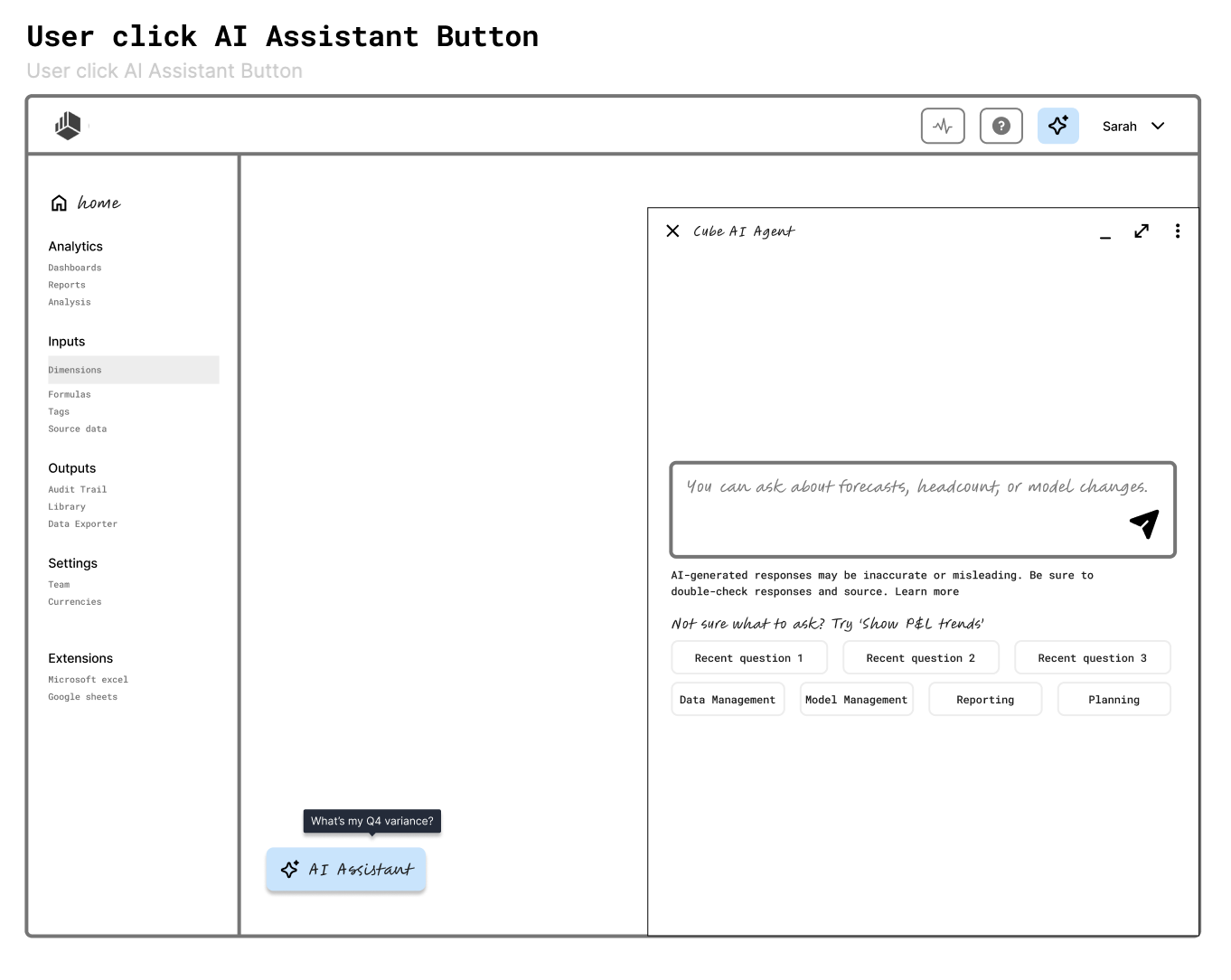
The hardest part of this project wasn't the UI. It was getting cross-functional alignment on what AI should and shouldn't do in the product. Before I could design anything meaningful, I needed to answer: what actions can AI take, what does it surface, and how does it hand off to the user? I used an early lo-fi wireframe of the portal experience as an alignment artifact — not to show the final design, but to give teams something concrete to react to. That wireframe became the foundation that subsequent epics, including the consolidated system described later in this case study, built from.
Research: Understanding How FP&A Users Actually Work
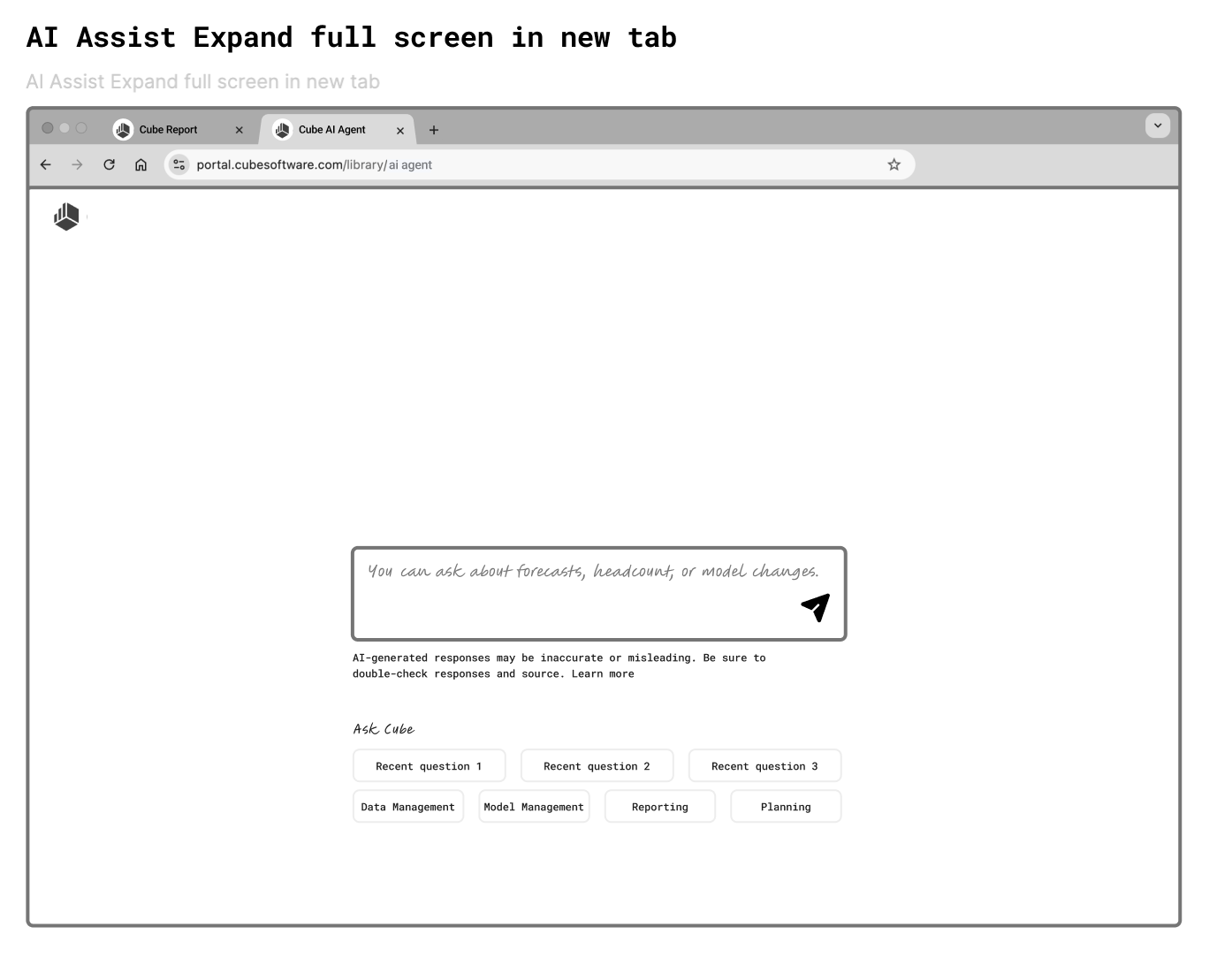
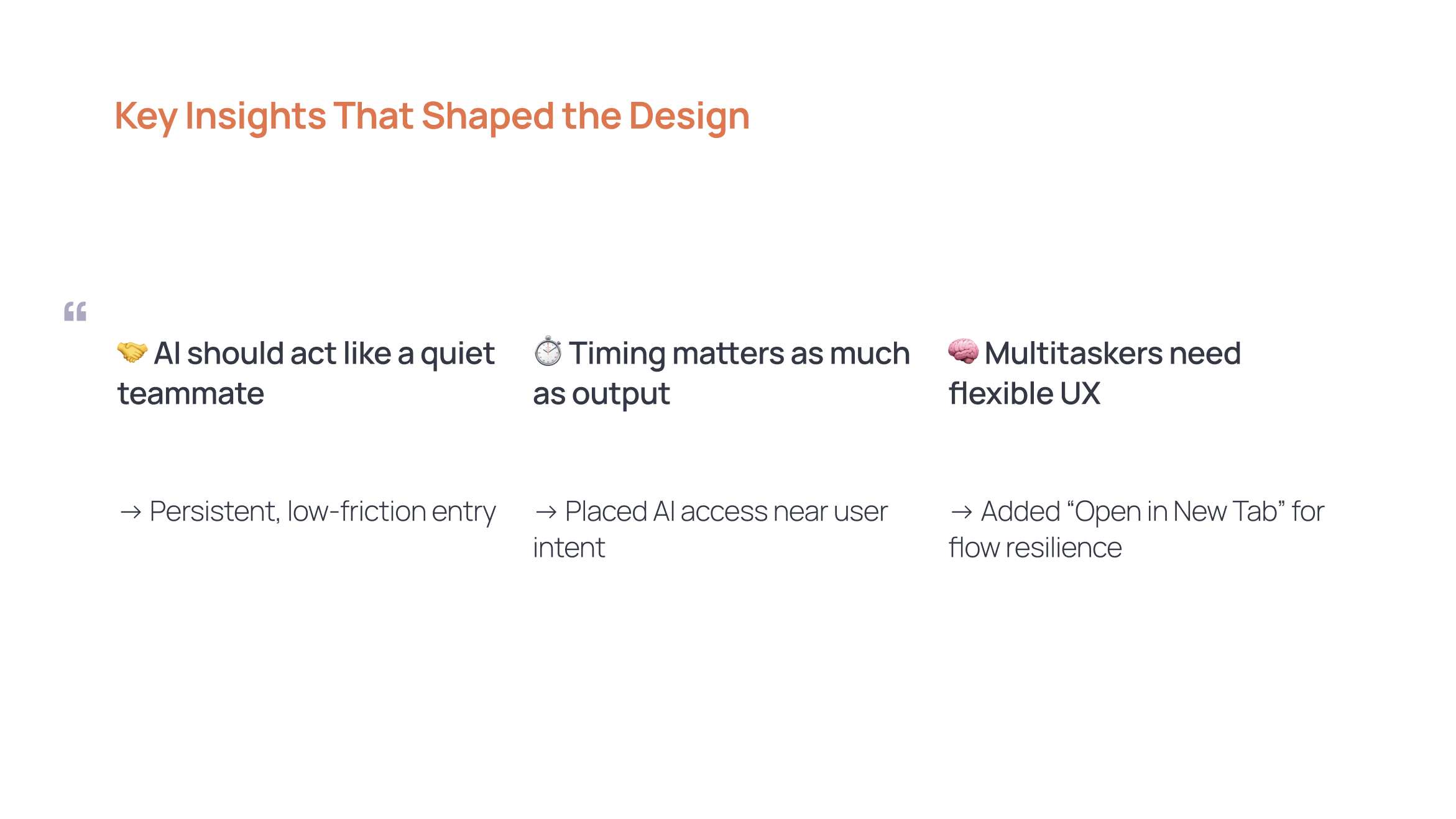
I partnered with a product expert to study real user workflows. The key insight was simple but shaped everything: our users multitask constantly — multiple tabs, multiple tools open at once. That meant AI output couldn't be blocking or demanding attention at the wrong moment. It needed to be available when users wanted it, invisible when they didn't. This led directly to two decisions: placing the AI trigger near natural points of intent, and adding an "Open in New Tab" option so users could engage with AI without losing their place.
Decisions That Shaped v1
The progressive disclosure approach was the thing I kept coming back to throughout the project. The AI Agent starts as a lightweight panel — unobtrusive, easy to dismiss. From there, users can expand to full screen or open in a new tab depending on how deep they want to go. This wasn't just a UI pattern choice — it was a deliberate stance on how AI should behave in a workflow tool. It shouldn't demand your full attention. It should earn it. This mirrors a broader pattern in trust-and-AI research: trust tends to be shaped more by early, low-risk interactions than by any single powerful feature, which is part of why starting light mattered more than starting complete.
The chat history scoping decision was a different kind of pride. For the first release, I intentionally kept it simple — a modal with search, showing recent sessions, easy to dismiss. I could have designed something more robust, but I made a conscious call to start lightweight and leave room to evolve. If usage grows, the system can expand to support tags, folders, and export. That kind of intentional restraint is harder to defend than building everything upfront, but it was the right call for a v1 with an uncertain adoption curve.
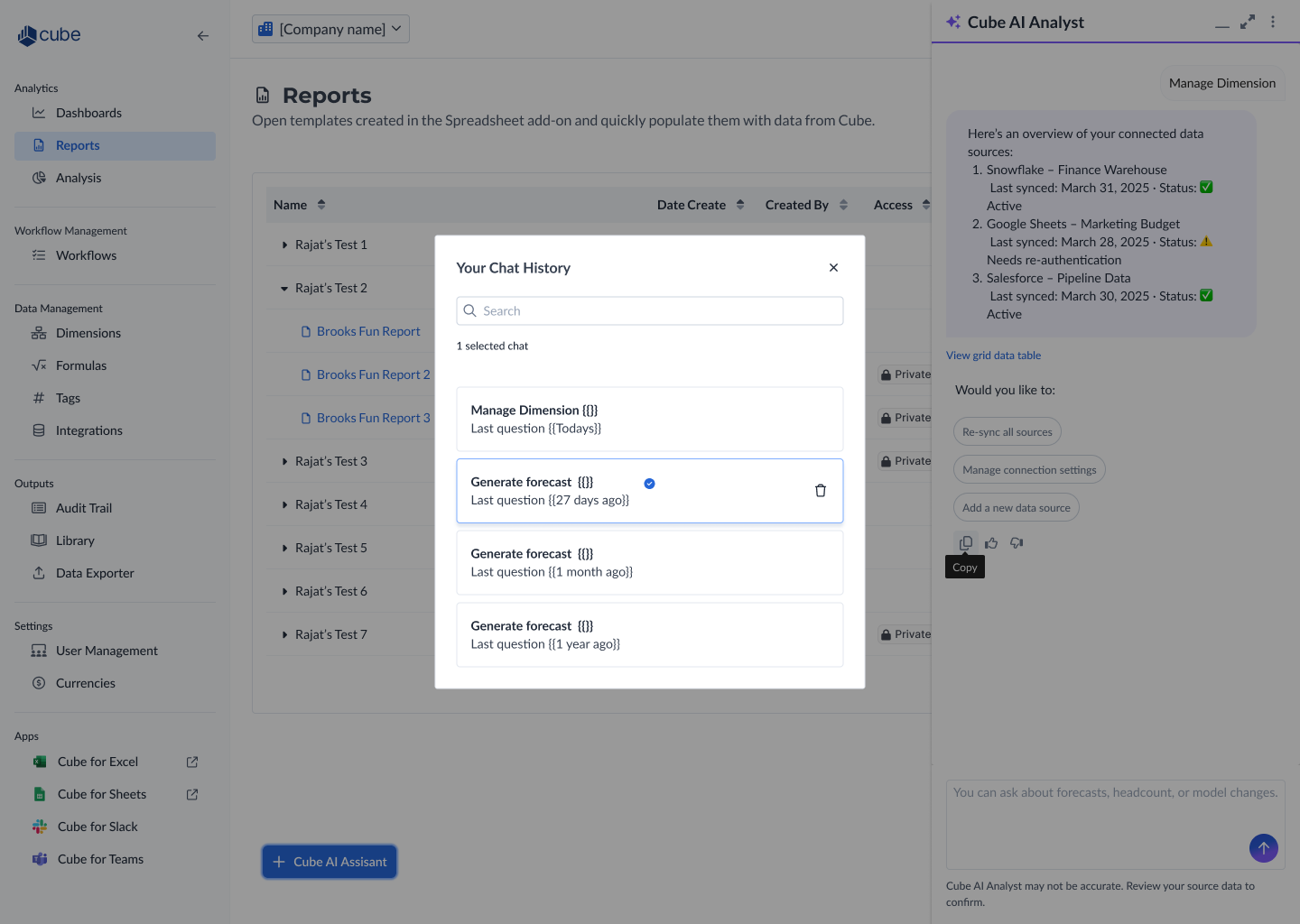
Consistency Across Channels
As the work expanded to Slack and the homepage, the core design principles carried over: persistent low-friction entry, trust signals (AI disclaimer, feedback thumbs), suggested follow-ups to reduce cognitive load, and non-blocking output. The Slack plugin adapted the pattern for a messaging context — lighter, faster, with a "Share to channel" action that made AI output collaborative rather than private. The goal was that a user moving between the portal and Slack would feel like they were talking to the same AI, not two different products.
Expanding AI Into Existing Workflows (2025, Earlier Iteration)
Note: the interaction pattern in this section is an earlier iteration, since superseded by the consolidated system described in "Consolidation: Meet Charlie" below. As the AI Agent gained traction, the next challenge was integrating it into Cube's existing, complex workflows — not just adding AI as a new surface, but threading it into processes users already depended on. The data source mapping workflow was one of the first. Mapping is a high-stakes operation: if dimensions are misconfigured, reporting breaks. The design challenge was to offer AI assistance — automated suggestions, an AI Accelerator Chat — without disrupting the existing flow or introducing new errors. A lot of the real design work at this stage happened in the margins — reconciling language and interaction patterns across agents in review threads with engineering and product, so the product didn't feel like several different AI experiences stitched together. Those conversations directly informed the unification work that followed.
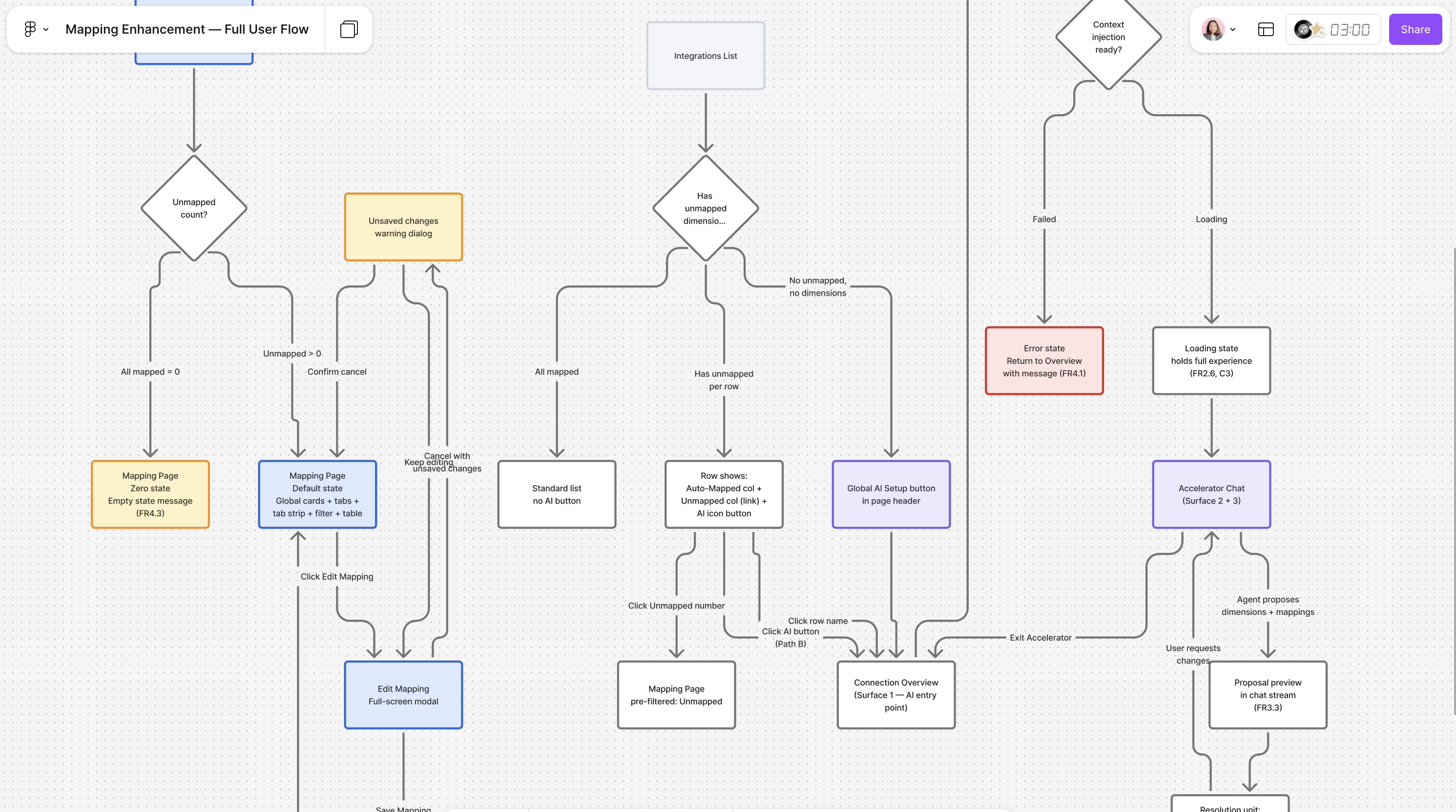
Note: This user flow is a process artifact shared for portfolio purposes. Final UI and product implementation details are not shown due to NDA.
Iteration: Rethinking Where AI Lives in the Navigation
Early on, AI was tucked into the existing information architecture — a panel accessible from wherever you happened to be, but with no home of its own. As the number of AI capabilities grew, that started to work against us: users didn't have a clear mental model of what AI could do or where to find it beyond the one entry point they already knew. We took that feedback and restructured the navigation so AI got its own dedicated tab, rather than living as a feature bolted onto existing surfaces. That single IA change did two things: it made the growing set of AI capabilities discoverable on their own terms, and it planted the seed for what became the Agent Hub — the project that eventually produced Charlie.
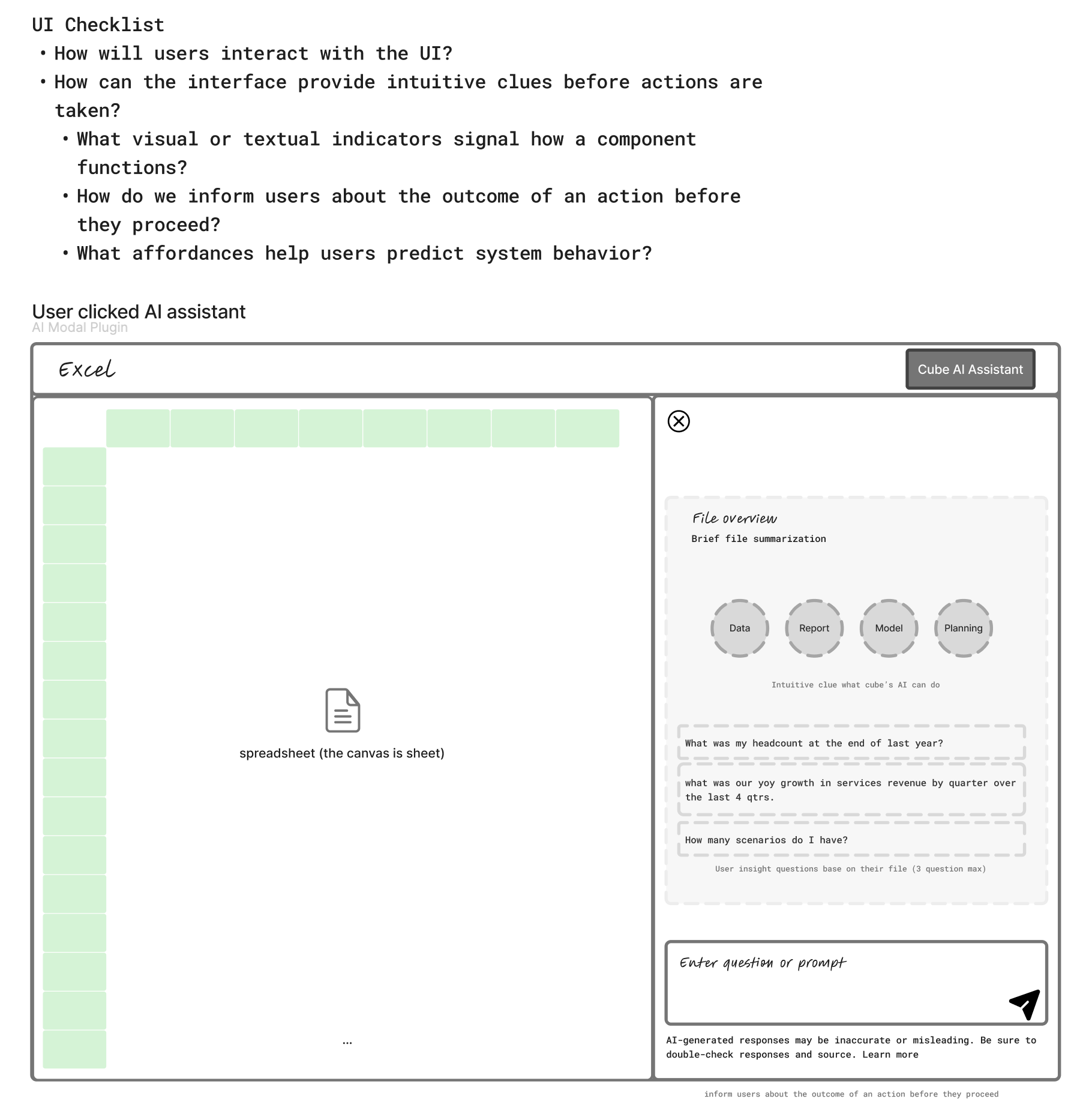
Brainstroming: AI as an embedded in Cube Plug In App
From Requirements to Roadmap
As usage grew, the question shifted from "does AI work here?" to "which AI capabilities matter most?" Alongside the conversational AI Agent, I designed a browsable catalog of pre-built Agent Apps — Variance Insights, Headcount Planning, Cash Flow Analysis — tagged by type (Analysis, Planning, Forecasting, Reporting) so users could scan for the exact insight they needed without having to know what to ask for.
Rather than guessing which agent apps mattered most, I paired that catalog with a structured intake: app name, the data dimensions it should analyze, business use case, and a criticality rating, alongside a live "Most Requested" leaderboard. It turned feature prioritization into something users could see themselves shaping, rather than a black box roadmap — and it fed directly into what got built next.
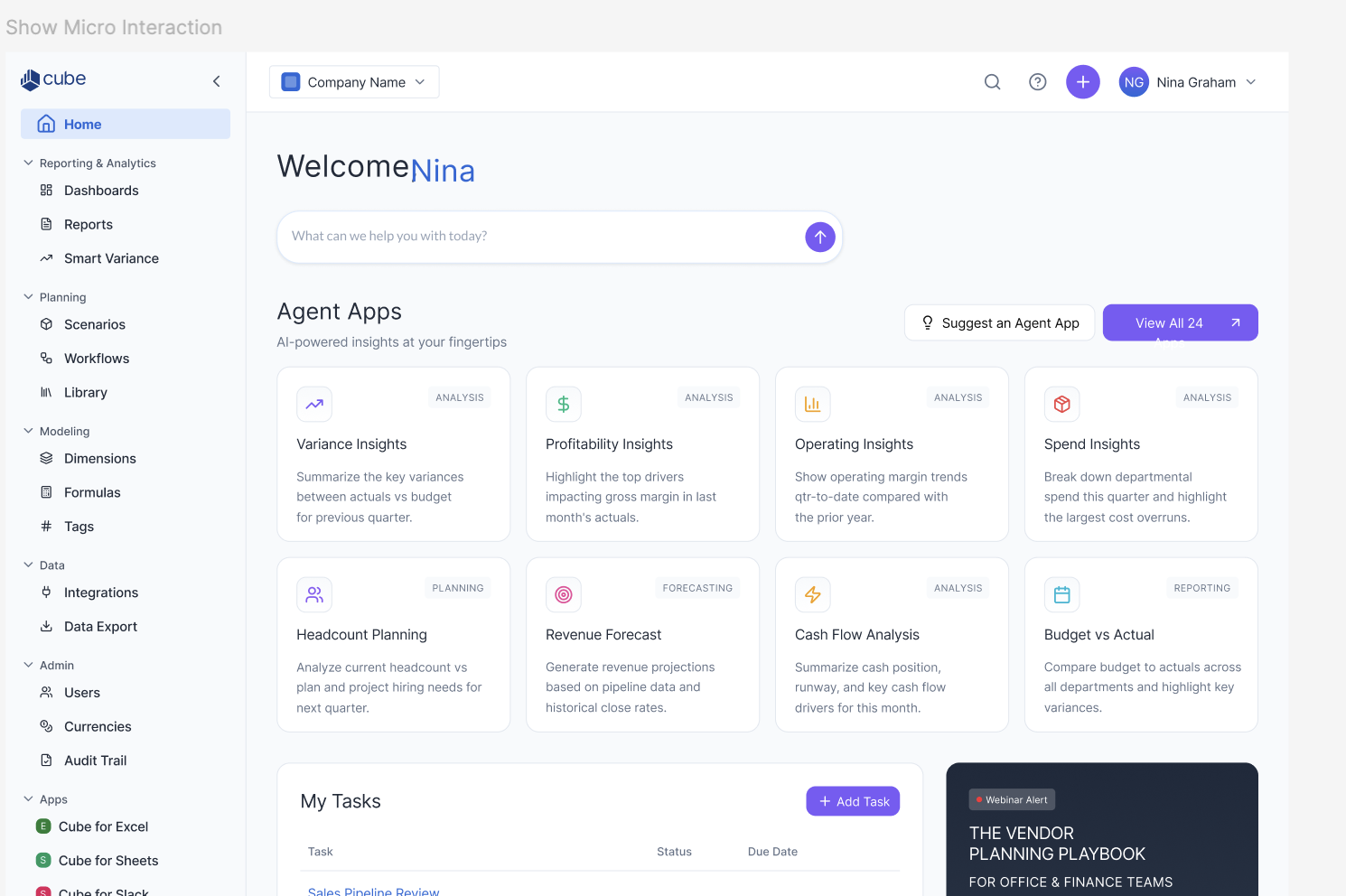
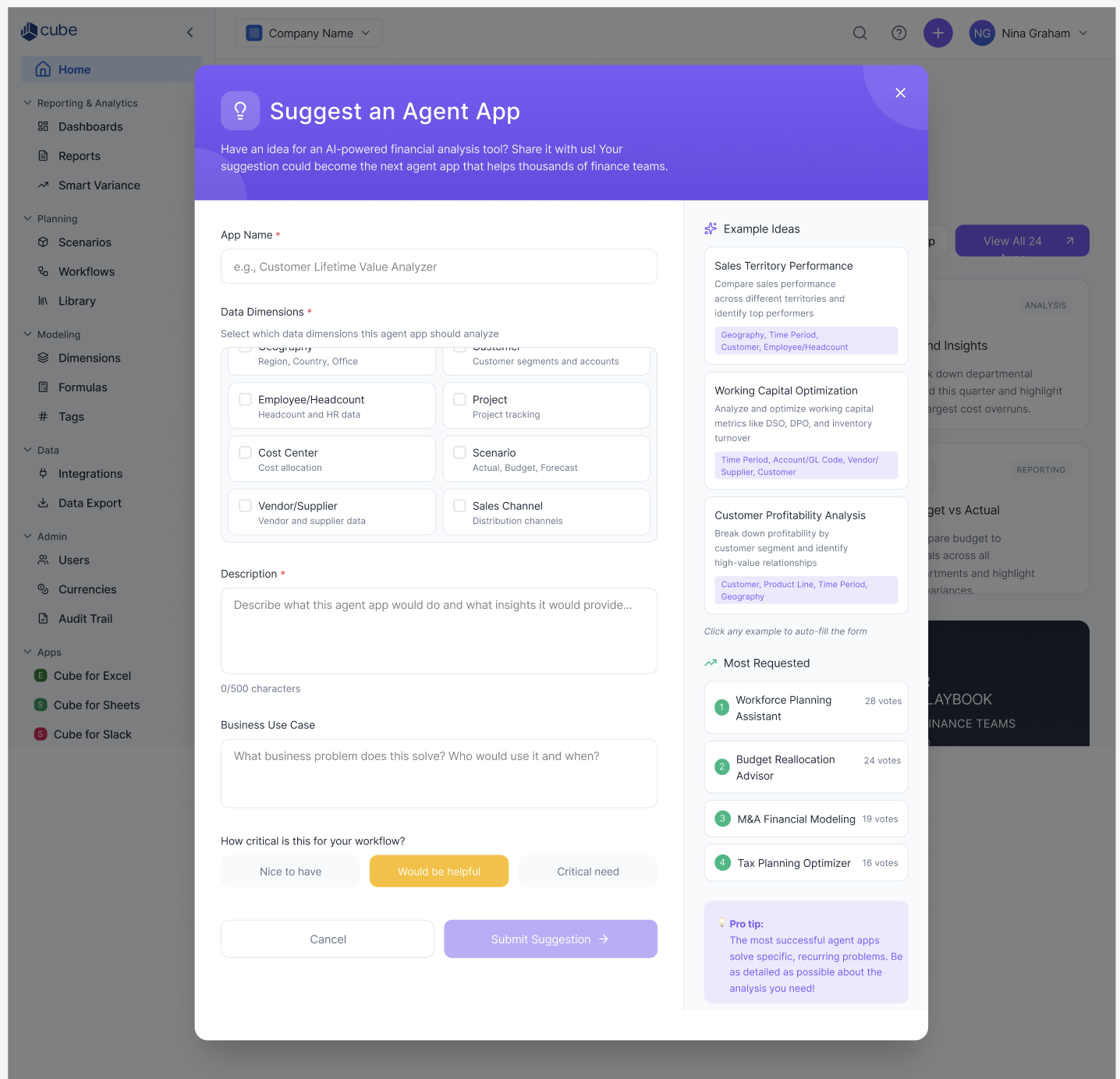
Brainstroming: Agent Apps catalog and the Suggest an Agent App intake form with its Most Requested leaderboard
Consolidation: Meet Charlie (2026, Current)
The AI Agent had proven itself across surfaces, but users were starting to encounter it differently depending on where they were — a chat here, an agent app there, a plugin somewhere else. The next evolution wasn't a new feature. It was unification. Charlie became a single entry point that routes any request to the right specialized agent — Analyst, Planner, Business Partner, Data Manager — instead of asking users to know which tool to reach for. Agent access was woven directly into the homepage alongside the tasks users were already working through, rather than treated as a separate destination.
Two things carried this from a single chat into a trustworthy system. First, answers needed to leave the chat window to be useful: I designed the hand-off from a conversational answer to a shareable artifact — Slack, Teams, PPT, Google Slides — so an insight Charlie surfaced could go straight into a deck without reformatting. Second, trust in AI isn't just about good answers, it's about how gracefully it fails. I mapped every failure mode — couldn't process, hit a message limit, low-confidence response — to a specific, actionable message instead of a generic error. The same lightweight, file-aware panel pattern carried into Cube's Excel plugin. This is the shipped, current-state system — the product Charlie and the AI Hub represent today.
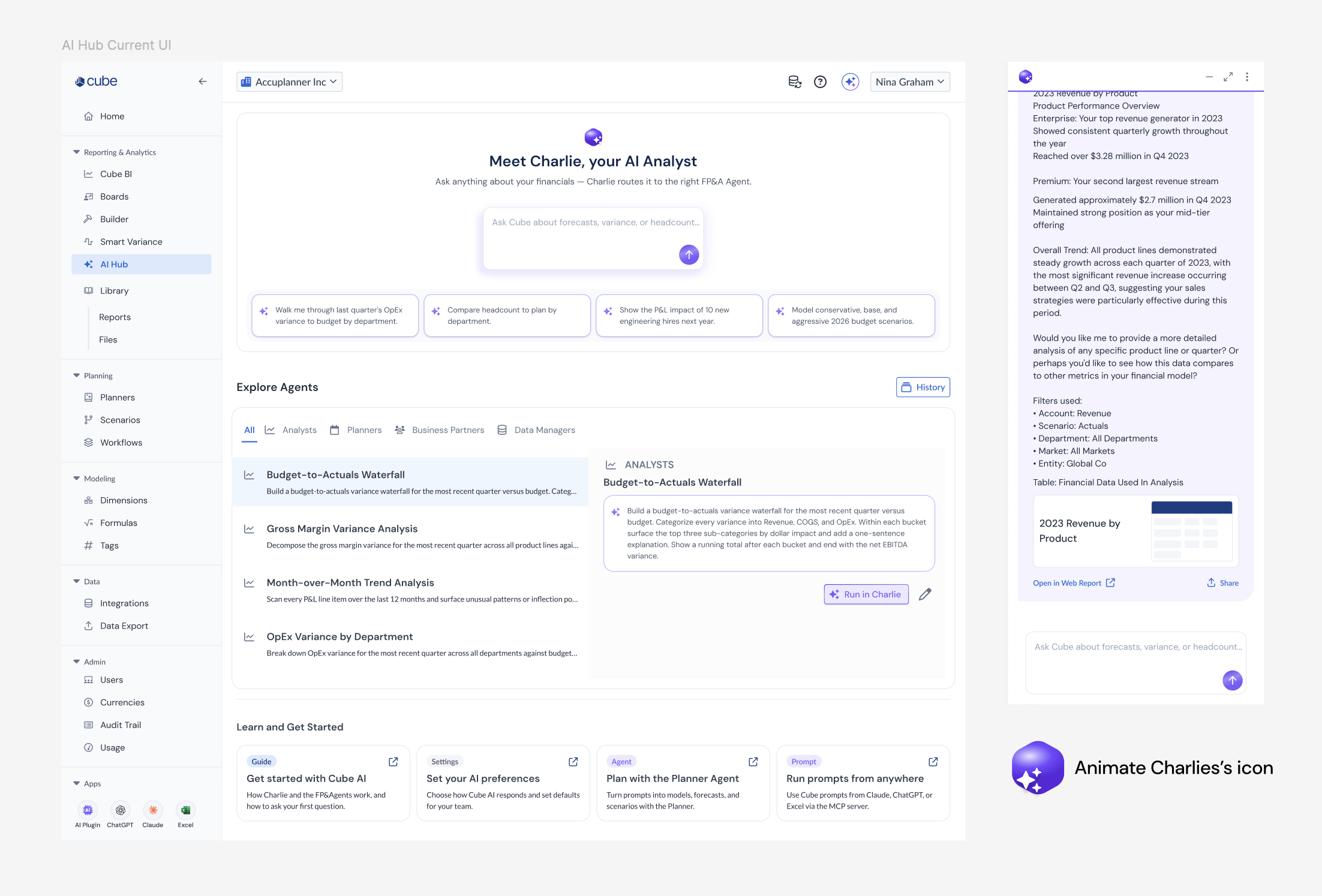
Outcome
Across both phases, the AI Agent shipped across the portal, Slack, and Excel, culminating in Charlie and the AI Hub. Customer Success reported that sales demos using the AI Agent led to shorter Q&A sessions — the agent was answering questions before they were asked. Engineering flagged the phased implementation model as one of the smoothest handoffs of the quarter, and the progressive disclosure approach from v1 gave engineering a clear, phased implementation path that kept scope manageable across multiple epics — including the consolidation into Charlie. We don't yet have hard adoption metrics to share publicly, but two signals point in the right direction. Usage-based AI credit consumption has grown month over month since launch — an early signal that users are finding enough value to spend on it repeatedly. We also use useformat.ai to systematically capture and route feedback from user and account manager conversations into the product roadmap.
LinkedIn launch announcement for the Cube AI Hub, shared to Cube's 11,128 followers.
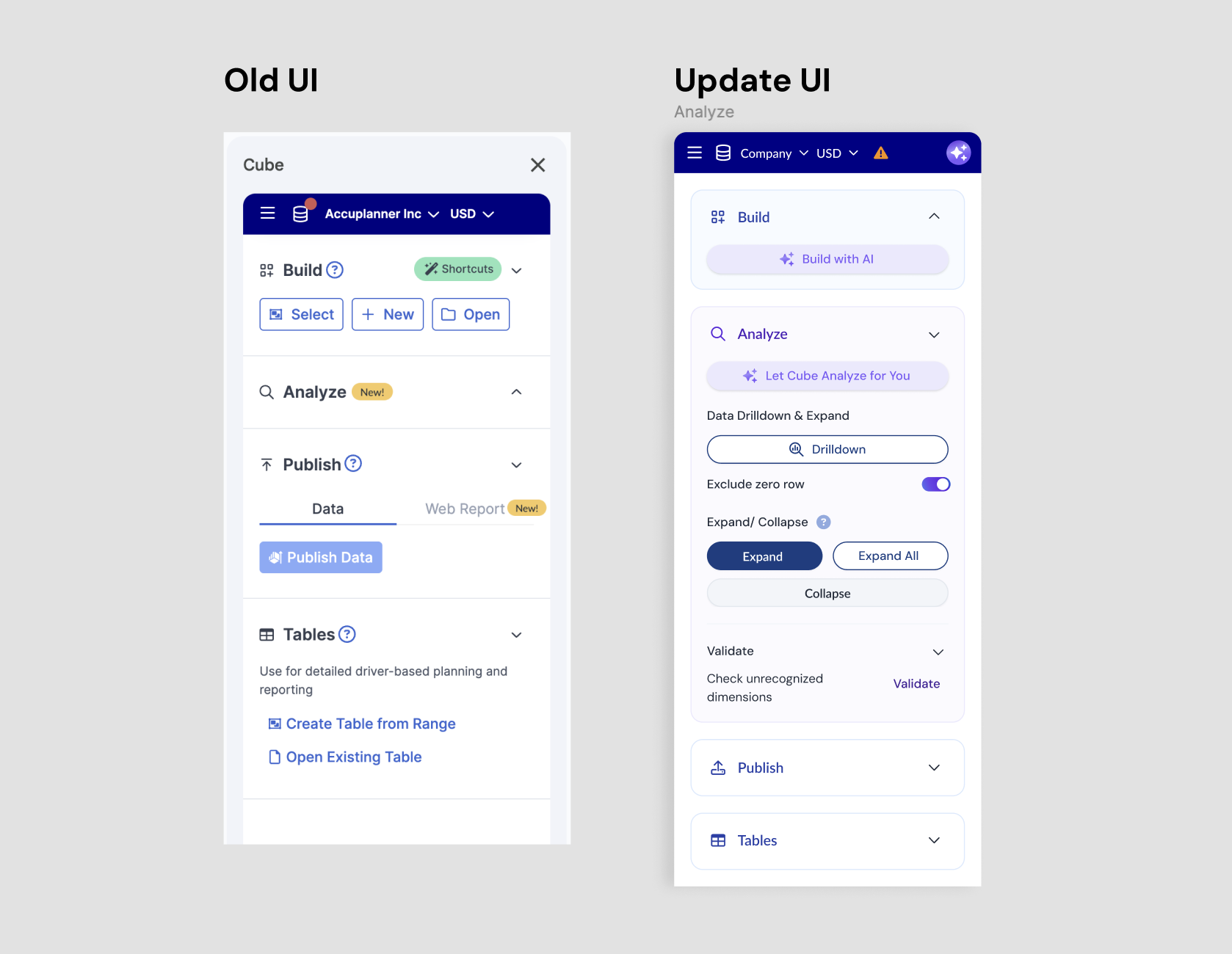
Old UI vs. Updated UI — the redesigned AI Agent panel, rebuilt into the design system using Claude to prototype faster.
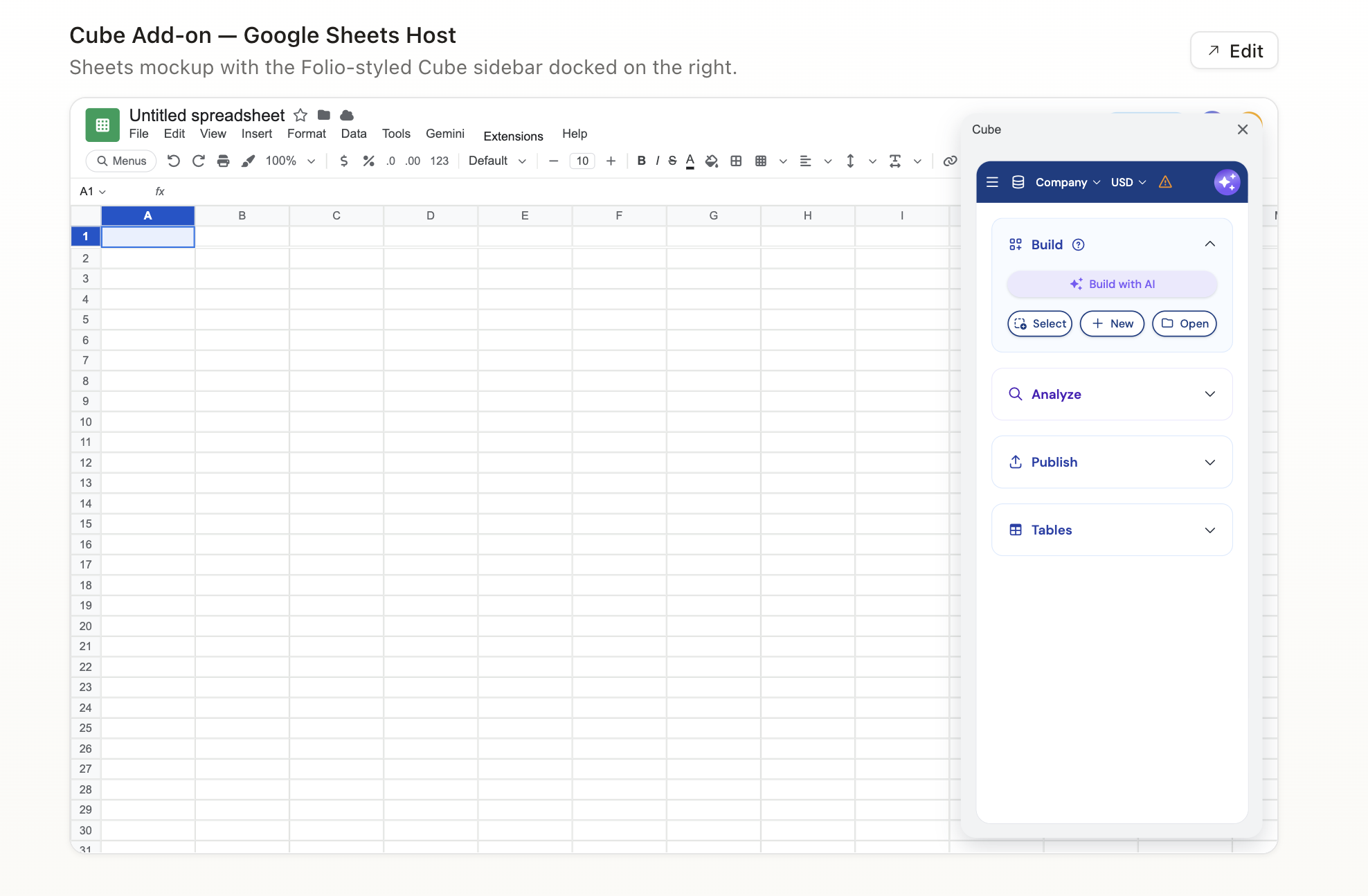
Note: The updated UI shown above reflects an intermediate iteration of the Cube Sheet plugin. Subsequent work — including data source mapping integration and the Cube Sheet AI assist — includes further visual and interaction updates not shown here due to NDA.

What's Next
The work didn't stop at integrating the AI agent. As adoption grew, a new challenge surfaced: the AI returned plain, unstructured text — functional, but not ready for how FP&A users actually present their work to executives and board members.
Rather than waiting for an engineering sprint, I prototyped a solution independently. Using CSS and Claude, I built a working demo that transformed raw AI output into structured, visually formatted responses users could take straight into a board deck. Once the concept was proven, I handed the CSS to engineering as a working reference — not a spec to interpret. It shipped.
That's how I approach technical constraints: I don't let them define the ceiling of the experience. Where a gap exists, I prototype across it. In hindsight, I'd have pushed earlier for a shared AI interaction spec — one document defining how AI behaves across all surfaces before individual epics kicked off. Alignment happened through iteration instead of upfront, and with a product moving this fast, that foundation would have reduced drift. I'm continuing to explore how output formatting and micro-interactions together build trust in AI — because trustworthy AI isn't just about what it says, it's about how it shows up.
Interested in hearing more about this project or the design decisions behind it? Get in touch — or read another case study.


